The TripleLift Reporting API is a GraphQL service for retrieving performance data, matching the functionality of the query tool in the TripleLift Console and Reports in TripleLift Direct. Query exactly what you need by defining specific dimensions, metrics, and filter values.
- Base URL: https://reporting-api.triplelift.net/
- HTTP Method: POST
- Schema Requirement: All request payloads must conform to the published GraphQL schema.
Authorization
Authorization requirements vary by endpoint type. Select the appropriate method below based on whether you are querying Seller Reporting or Buyer Reporting.
Seller reporting
In the Reporting API:
- publisherNetworkReport and ctvPublisherNetworkReport query endpoints
There are two HTTP headers that must be set to authorize a request to the TripleLift Reporting API:
The API key and the JWT can both be obtained programmatically or via the TripleLift Console, a self-serve platform.
To access your API key and JWT via the self serve portal:
- Log in to the TripleLift Console
- From the top menu bar, locate the Reporting dropdown
- Click on Reporting API
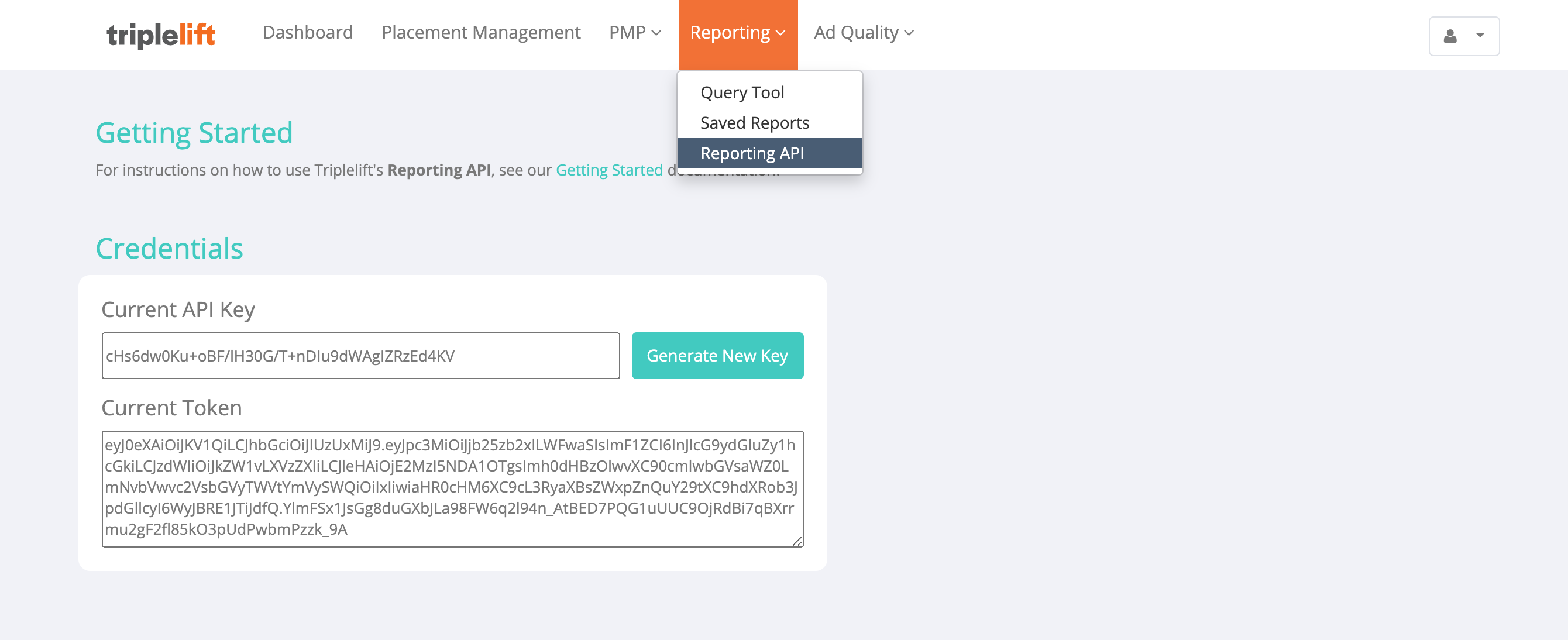
Obtaining an API Key
The API key is unique to your TripleLift member account. It does not expire, but it can be invalidated if a new key is generated.
Generating a new key changes the key for all users and programs that query the API on behalf of your TripleLift member account.
Manually
From the TripleLift Console, select Reporting API from the Reporting menu. In the section titled "Current API Key", copy your existing API key, or click Generate New Key to invalidate the existing key for everyone in your TripleLift member account and obtain a new key.
Programmatically
Make a post request to the /generate-api-key endpoint to invalidate the existing API key for everyone in your TripleLift member account and obtain a new key:
curl \
-X POST https://reporting-api.triplelift.net/generate-api-key \
-H 'X-API-Key: YOUR_API_KEY' \
-H 'Authorization: Bearer YOUR_JWT' \
-H 'Content-Type: application/json' \
-d '{"id": "YOUR_MEMBER_ID", "overwriteExistingKey": true}'
Obtaining a JWT
The JWT (JSON Web Token) expires after a period of one month. You will need to periodically obtain a new token.
Manually
From the TripleLift Console, select Reporting API from the Reporting menu. In the section titled "Current Token", copy your JWT.
Programmatically
Make a post request to the /login endpoint:
curl \
-X POST https://api.triplelift.com/login \
-H 'Content-Type: application/json' \
-d '{"username": "YOUR_USERNAME", "password": "YOUR_PASSWORD"}'
The JWT token will be a top-level field in the response JSON, called reporting_api_token.
Buyer reporting
In the Reporting API:
- advertiserReport query endpoint
Please refer to the steps outlined in the Curation API Guide to obtain a token.
If you do not have credentials to access the Curation API or the Guide, please contact your TripleLift representative.
Exploring the Reporting API
Please refer to the GraphQL schema for up to date information on available endpoints, dimensions, and metrics in the TripleLift Reporting API.
You can explore the API using cURL, Altair, or an API client of your preference, once you have obtained your API key, JWT, and have a TripleLift member account ID.
Altair
Altair is a tool that displays GraphQL schema documentation and auto-completes queries to the GraphQL server. Altair is hosted on: https://reporting-api.triplelift.net/altair.
There are a couple of options to access it, and requests must always be issued with the API authorization headers.
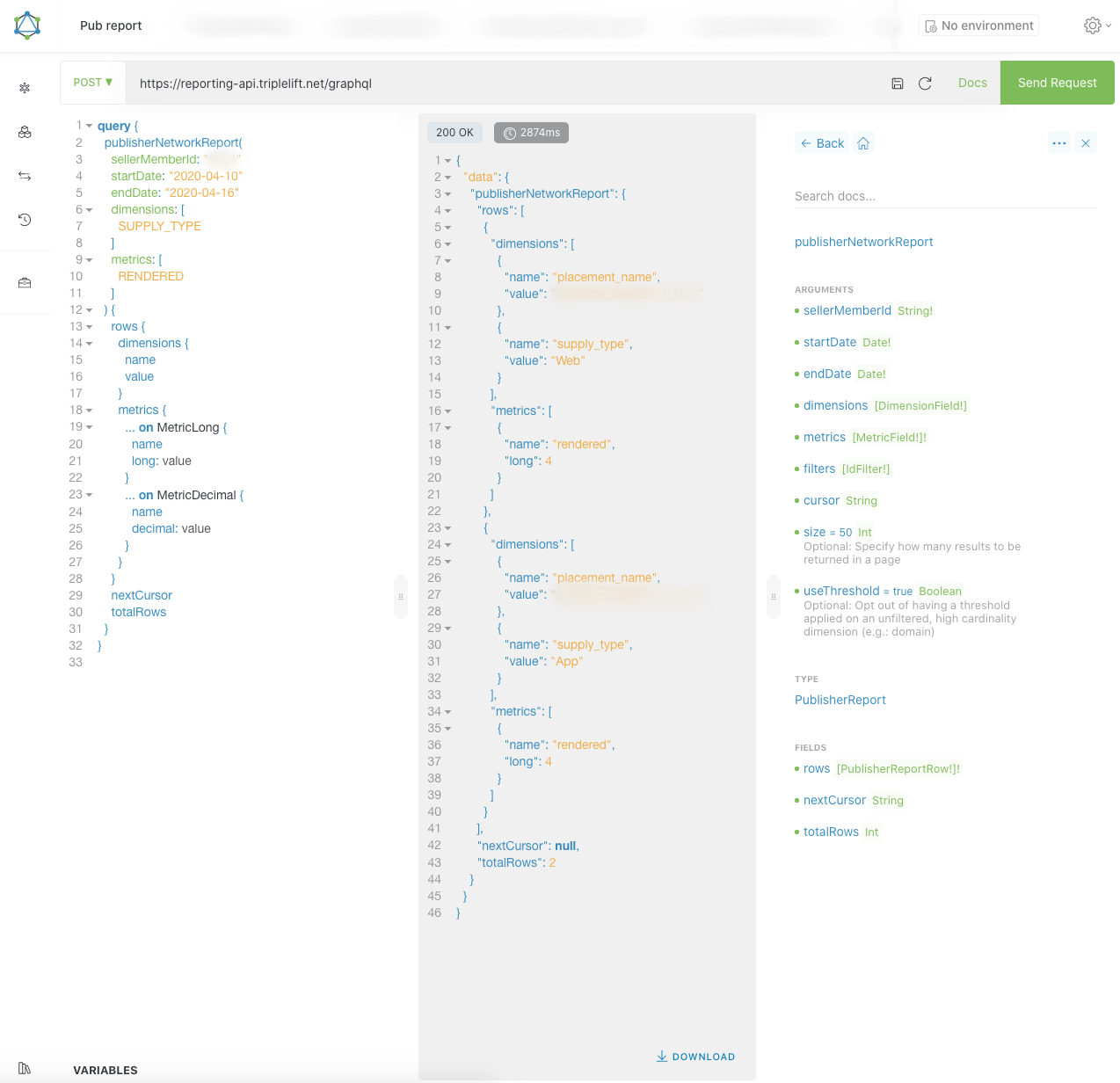
Altair via the Desktop Console
You can access Altair by downloading the Altair desktop console.
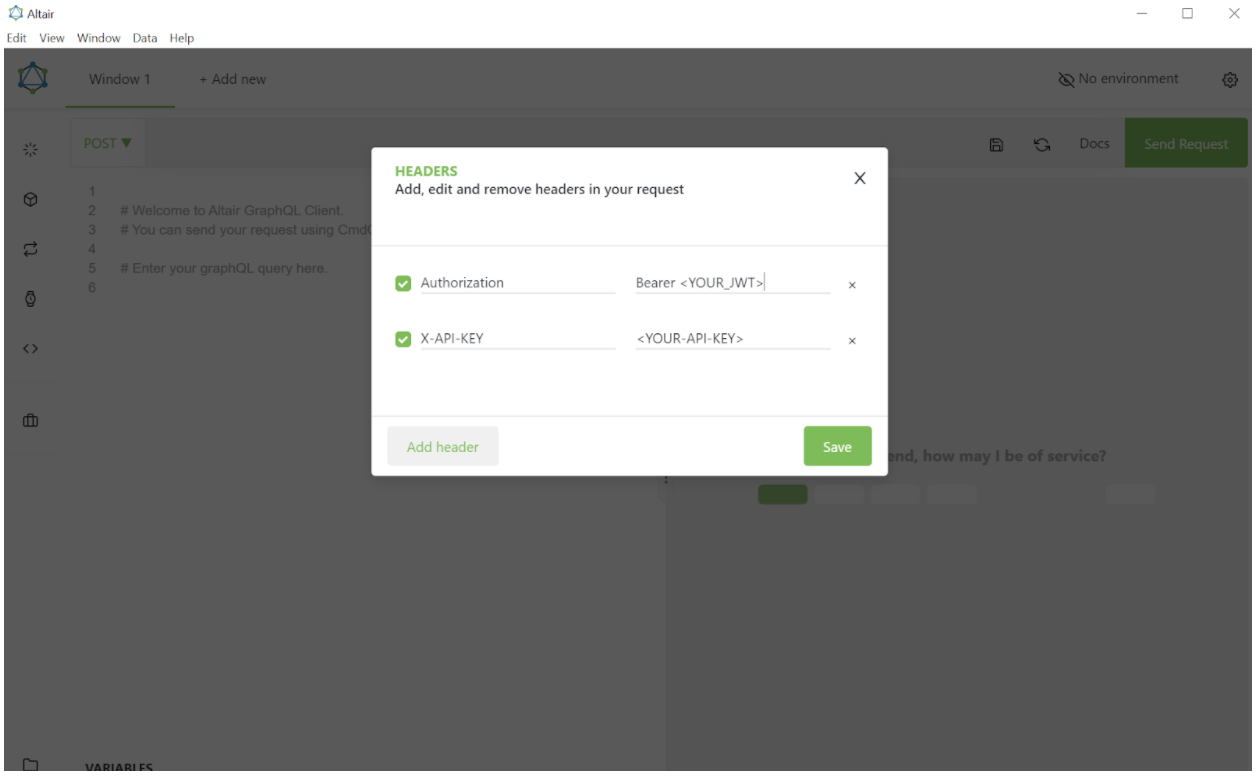
Altair via the browser
You can access Altair from your browser by injecting the authorization headers using a browser extension. We will walk through how to do so specifically with a Chrome browser extension called Requestly.
Begin by adding a new Requestly rule of type “Modify Headers.” Within the rule, define the following header values:
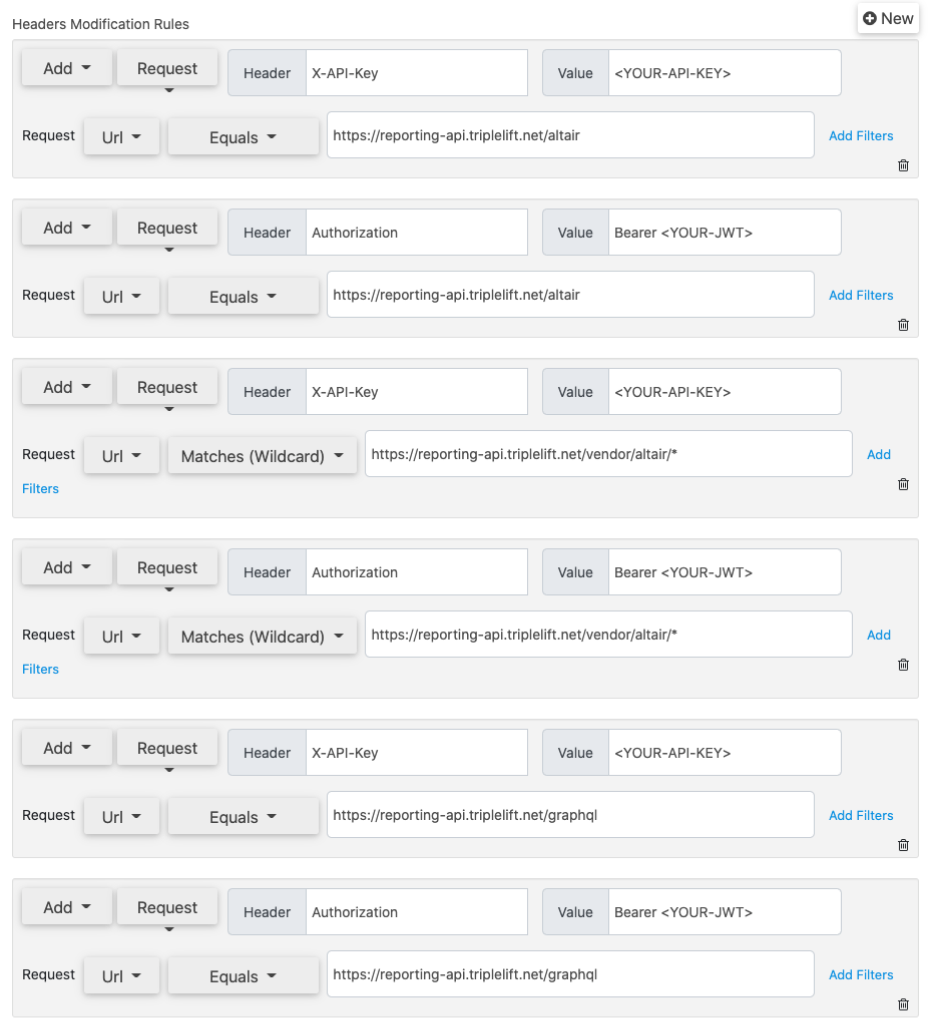
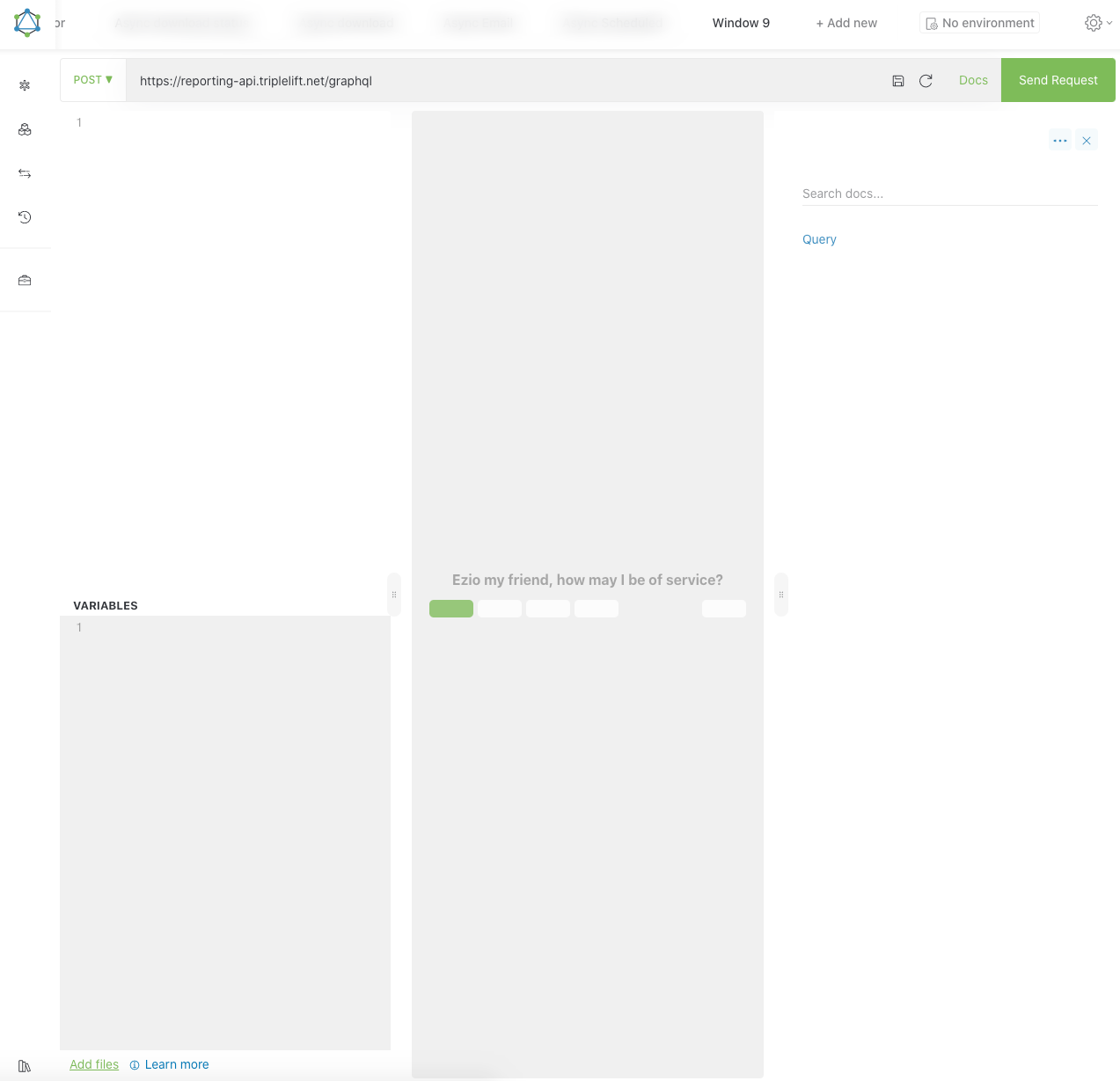
Save the rule and navigate to https://reporting-api.triplelift.net/altair (or refresh the page if you are already on it). You should now see the console:
cURL
To get started, please refer to the GraphQL docs on how to send requests.
You can also try the sample query below. First, fill in the authorization headers with your JWT and your API key, then add your TripleLift member ID in the sellerMemberId field.
curl -X POST \
-H 'Authorization: Bearer YOUR_JWT' \
-H 'X-API-Key: YOUR_API_KEY' \
-H "Content-Type: application/json" \
--data '{"query": "query {
  publisherNetworkReport(
    sellerMemberId: \"YOUR_MEMBER_ID\",
    startDate: \"2024-01-01\",
    endDate:  \"2024-01-01\",
    dimensions: [YMD],
    metrics: [IMPRESSIONS]
  ) {
    rows {
      dimensions {
        name
        value
      }
      metrics {
        ... on MetricLong {
          name
          long: value
        }
        ... on MetricDecimal {
          name
          decimal: value
        }
      }
    }
    nextCursor
    totalRows
  }
}", "variables": {}}' \
https://reporting-api.triplelift.net/graphql
Querying guidelines
| Query Attribute | Impact |
|---|---|
| Date Range | A wider date range will result in a larger report. Use the Asynchronous endpoints when querying significant date ranges. |
| Dimensions | Results are grouped by dimensions. A higher number of dimensions will group results into more rows, and more rows will result in a larger report. |
| Dimension Cardinality | Cardinality refers to the number of unique values. Browser is considered a low cardinality dimension, while Domain has the potential to be a very high one. High cardinality dimensions can dramatically increase the number of rows in a report. The domain threshold query parameter can optionally be applied to a query to roll up low-performance domains into a single row in order to reduce report size. |
| Metrics | This has less impact on report size than the number of dimensions, as metrics do not increase the number of result rows, only the number of result columns. |
| Filters | Greater specificity of a filter, and a higher number of filters, will result in a smaller report. |
{
  "path": "/graphql",
  "retry-after": 2,
  "error": "Forbidden",
  "message": "Too many requests, please wait before trying again",
  "timestamp": "2024-05-06T21:17:23.036+0000",
  "status": 429
}
Data granularity
Daily
Daily granularity is the default granularity for reports.
Daily granularity data is available for the past 15 months up to yesterday (UTC).
Hourly
Hourly granularity takes effect when the HOUR dimension is selected. This returns data for all hours within the given startDate and endDate interval.
Hourly granularity data is available for the previous day and the current day (in UTC time).
It is possible to report on either a single hour or multiple hours for a given day. To do so:
- Add an
HOURfilter to your query - Since the filter is applicable to a single day, the
startDateandendDateargs must match - Since filtering by multiple hours is allowed, the
HOURdimension must be selected to receive data split by hour
e.g., An hourly granularity query filtered by hour:
query {
  asyncDownloadPublisherNetworkReport(
    sellerMemberId: "YOUR_MEMBER_ID",
    startDate: "2023-03-09",
    endDate: "2023-03-09",
    dimensions: [
      HOUR
      DEVICE_TYPE
    ],
    metrics: [
      IMPRESSIONS
    ],
    filters: [
      {
        dimension: HOUR,
        values: ["0", "12", "23"]
      }
    ]
  )
}
e.g., The resulting hourly granularity report:
HOUR,DEVICE_TYPE,IMPRESSIONS
0,Desktop,15
0,Phone,25
12,Desktop,16
12,Phone,26
23,Desktop,17
23,Phone,27
FAQs
What timezone is the data in?
All data is in UTC.
When is data for the current day available?
Current day data is not available in real time. Data is subject to processing delays, but the first hour of the day can generally be expected by 10:00 UTC.
What currency is the data in?
All monetary fields are in USD.
What dimensions & metrics are available to query?
Please refer to the GraphQL schema for up to date information on available endpoints, dimensions, and metrics in the TripleLift Reporting API.
You can start exploring the API using Altair, once you have obtained your API key, JWT, and have a TripleLift member account ID.
How does the domain threshold rollup work?
Domain is one of the highest cardinality fields exposed via the TripleLift Reporting API. Adding domain as a dimension can increase the number of rows by a factor of 100x or more.
Therefore, whenever a query contains the domain dimension, we automatically roll up all rows which contribute a marginal amount (less than 0.1%) of the total renders for the query into a single row with the domain name “Other”.
e.g. If a report has a total of 2,000 renders, and you queried for the domain dimension, then any domain with fewer than 2 renders (2,000 * 0.001) will be rolled up into a single row with the domain name “Other”.
You can opt out of this behavior with the optional query parameter useThreshold.
How should the CSV from the asynchronous endpoints be parsed?
When using the asynchronous endpoints, you'll receive a response in the form of a CSV. When parsing the results:
- fields may have null values
- all fields are unquoted, unless a string field contains a special character such as a quote or a delimiter. e.g.:
example".com  =>  "example"".com"
example,.com  =>  "example,.com"
example\.com  =>  example\.com   (unchanged)
What’s the source of the ORTB dimensions in the CTV endpoints?
Part of the ORTB and AdCOM specs, the content object surfaces metadata about the content in which an ad impression will be rendered. The ORTB dimensions are available in the ctv* endpoints.
From the IAB TechLab:
[The content] object describes the content in which an impression can appear, which may be syndicated or non-syndicated content. This object may be useful when syndicated content contains impressions and does not necessarily match the publisher's general content. An exchange may or may not have knowledge of the page where the content is running as a result of the syndication method (e.g., a video impression embedded in an iframe on an unknown web property or device).
What’s the source of the TL_ dimensions in the CTV endpoints?
TripleLift maintains a catalog of data related to video content for In Show ad formats, including metadata like content producer, series title, genre, etc. which provides additional insight into content. This data is provided during the ingestion and analysis process of content for In Show ad formats by the content producer’s content management system. The TL_ dimensions related to video content metadata are available in the ctv* endpoints.
What's next